PDF Summaries
Upload long documents and get a focused summary that highlights the ideas that matter.
Smart document support for study and work
Summarize your files and documents with ease, and generate organized review questions from long PDF files in minutes.
Summarize your files with ease
Welcome back
From a long file to a clear result ready for reading and review.
A calm interface, clear options, and outputs you can save or download.
Core features
Upload long documents and get a focused summary that highlights the ideas that matter.
Turn document content into clear questions that help students and teams check understanding quickly.
Choose a short or detailed summary based on your time, goal, and document type.
Keep previous results in your account and return to them without uploading the same file again.
A simple interface for documents, summaries, questions, and saved results.
Download the summary as a PDF or save it inside the app for later use.
How it works
Choose a PDF from your device or drag it into the upload screen.
Choose summary only, review questions, or summary with questions.
Review the output, download it, or save it in your Khulasah history.
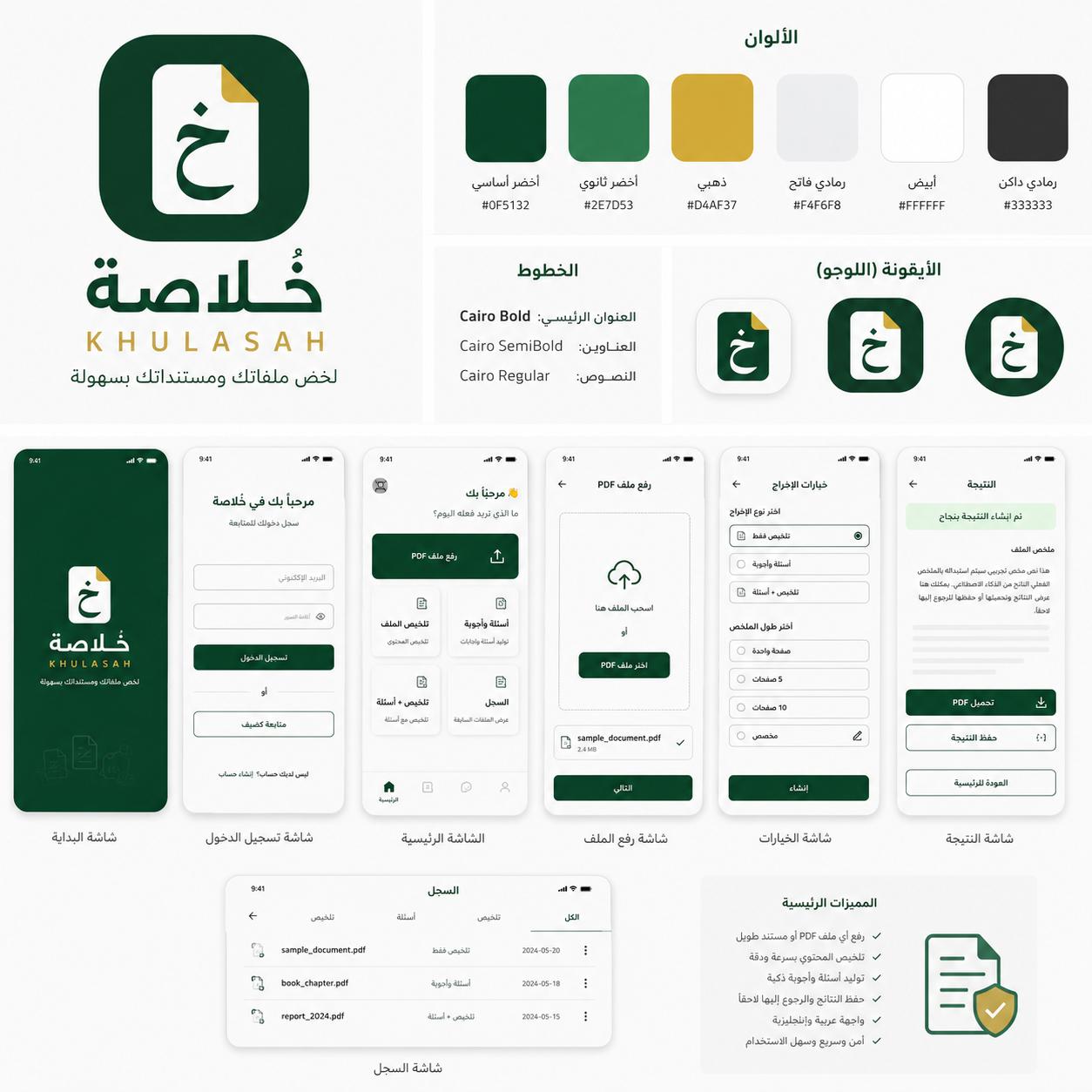
Brand and app screens
Khulasah uses a calm visual identity and direct task flow: upload the file, choose the output settings, then read or download the result.
Who it is for